

When it comes to making your website click with your users, it’s often the small stuff that makes the biggest difference.
Now “user experience” (or UX) might sound like a buzzword, but all it really means is: can people use your website easily, and do they enjoy the process? If the answer is yes, they’re more likely to trust you, stick around, and become customers.
The good news? You don’t need a full redesign to improve your UX as just a few key quick tweaks can significantly boost usability, engagement, and conversions.
So let’s look at 5 simple website changes you can make today that have a big impact—no design degree required.
1. Make Your Navigation Stupid-Simple
You’ve got about 3–5 seconds to convince visitors they’re in the right place. If they can’t figure out how to find what they need, they’re gone.
So what’s the problem?
Confusing menus or too many links overwhelm users. People want intuitive navigation—not a scavenger hunt.
Small tweaks, big payoff:
- Limit top menu items to 5–7 max
- Use clear labels like “Services,” “About,” and “Contact” (not “Explore Our World”)
- Make sure your menu looks great—and functions—on mobile
Bonus tip: Add a sticky nav bar (one that stays visible as users scroll). It helps users move around without scrolling all the way back up.
2. Optimize for Mobile
This may sound obvious, but even in 2025, we still see tons of websites that don’t look or function well on a phone or tablet.
So what’s the problem?
Over 70% of users browse on mobile. If your site’s buttons are too small, text is hard to read, or your layout breaks on a phone screen, people will bounce… lickety split!
Small tweaks, big payoff:
- Test your site on multiple devices (or use Google’s Mobile-Friendly Test)
- Make sure text is large enough to read without zooming
- Use tap-friendly buttons and links with plenty of spacing
- Ensure key info (like contact details and CTAs) are front and center
Bonus tip: Ensure your mobile menus do not require too many taps to get to important content. Keep it easy!
3. Speed Up Your Load Time
Thanks to digital media, we all know that patience and attention spans are basically zero! So if your website takes more than 3 seconds to load, your users have likely disappeared into the ether even before they’ve seen your homepage.
So what’s the problem?
Mobile or not, people just expect websites to load quickly and page speed affects everything from bounce rates to SEO to conversion rates.
Small tweaks, big payoff:
- Compress your images before uploading them (tools like TinyPNG or ShortPixel make it easy)
- Remove unused plugins and scripts
- Enable caching and use a fast, secure host (like the ones we offer at Hammersmith Support ????)
Bonus tip: Use a tool like GTmetrix or Google PageSpeed Insights to test your current load speed and get specific recommendations.
4. Simplify Your Contact Forms
Want to know what one of the most common UX killers is? Well, it’s the dreaded overcomplicated form.
So what’s the problem?
If a user wants to reach out but is faced with a long, clunky, or unclear form, it’s going to feel like way too much effort and they’re more likely to hit a boot camp class than your “Submit” button!
Small tweaks, big payoff:
- Only ask for what you actually need (Name, Email, Message is usually enough)
- Use clear labels and field instructions
- Test your form regularly to make sure it works (yes, even if it “worked last time”)
- Add a friendly confirmation message so users know their form went through
Bonus tip: Embed your form in multiple spots… not just the Contact page. Try adding it to your homepage or service pages to capture leads in the moment.
5. Use Clear, Clickable Calls to Action (CTAs)
Here’s a question for you: What do you want visitors to do next?
If you’re not guiding them clearly, they’re not going to guess.
So what’s the problem?
Do you have CTAs? Are they in multiple strategic locations? A CTA isn’t just a button. It’s your chance to turn interest into action… whether that’s scheduling a call, booking a service, or downloading a resource.
Small tweaks, big payoff:
- Use action words like “Book a Free Consultation,” “Get Started,” or “See Our Work”
- Make sure buttons stand out visually (don’t bury them in a wall of text)
- Repeat your CTA in multiple places: after your homepage intro, on service pages, in the footer
Bonus tip: Test different CTA phrases to see what gets more clicks. Sometimes changing one word can make a big difference!
It’s the Little Things That Add Up
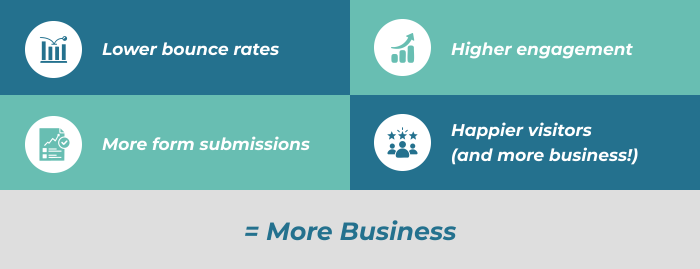
Yes! The following small, strategic tweaks can really add up:
FAQs
Q: How do I know which UX issues are hurting my site?
A: Start by asking people you trust to visit your site and give honest feedback. You can also use tools like Hotjar or Microsoft Clarity to watch real user behavior.
Q: Do I need to hire a designer for these tweaks?
A: Not always! Many of these changes can be made using your website builder or CMS (especially if you’re using WordPress, Squarespace, or Wix). But if you’re short on time, we’re here to help.
Q: What’s the most important tweak to start with?
A: Mobile optimization is #1. If your site doesn’t work well on mobile, it’s likely costing you leads and hurting your rankings.
Need Help or Want to Make These Tweaks Now?
At Hammersmith Support, we specialize in making websites work better. Whether you need help speeding things up, streamlining your forms, or just making your site easier to use, our team can take care of it so you can get back to running your business. Let’s chat about how we can support your website and help you grow your business.